When a Correction Is Not a Reversal
Learn how to read a news correction by separating a fixed error, added detail and a changed conclusion, so you can judge what an update alters.
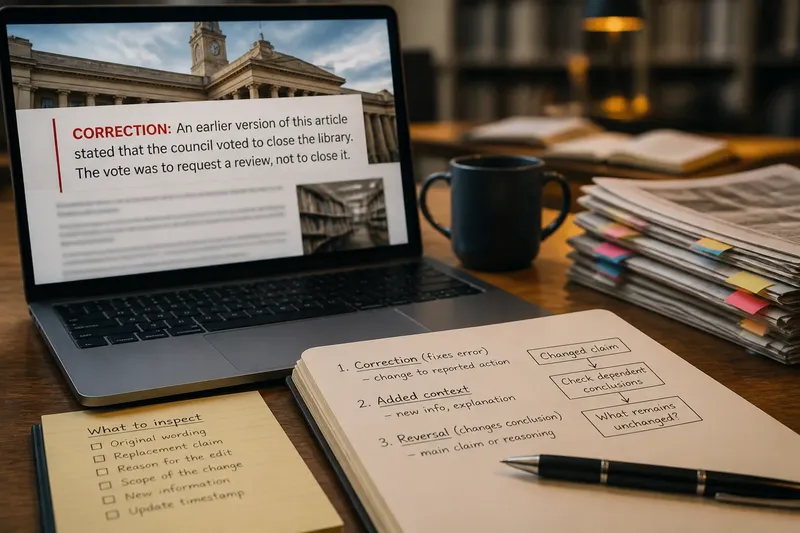
What is the smallest claim a news update changes? That question helps you tell a corrected detail from a reversal without treating every edit as a rewrite. A news correction may fix one name, or it may change what readers can conclude about a decision.
Start with the claim
Read the correction notice, then locate the sentence it identifies. Write down the original claim if the notice preserves it, and the replacement wording. If the old wording is unavailable, do not reconstruct it from memory; use the notice, a version history or a linked follow-up.
The outlet’s label is a clue, not a verdict. “Corrected” usually signals that something was wrong; “updated” may describe new material; “clarified” can mean either a cleaner explanation or a consequential change. Compare what the words say, not just what the notice is called.
Separate three changes
A correction replaces an inaccurate detail. Added context gives readers information that was missing without necessarily withdrawing an earlier claim. A reversal changes the main claim or the reasoning that supported it.
These can overlap. A newsroom might correct the reported action, add a source’s explanation, and alter the story’s central point in one update. Name each change separately rather than squeezing the whole edit into one label.
Trace the effect
Ask what depends on the changed sentence. A misspelled name may leave the account’s central point untouched. A corrected verb can shift the meaning sharply: “approved” and “requested a review” describe different actions.
Think of a sentence as a link in a chain. If a link changes, check which conclusions were attached to it; the rest of the chain may still hold, or it may need to be reconsidered.
Say a local report says a council voted to close a library, then issues a correction: the vote was to request a review, not to close it. Readers should revise their understanding of the council’s action. If a later update names the committee assigned to the review, that is added detail, not another reversal.
What should you inspect?
- Original wording: If the notice quotes it or a version history shows it, compare it with the new wording; if neither does, do not guess, and look for a follow-up.
- Replacement claim: If the new sentence names a different action, person or event, reassess conclusions that relied on the old version; if it only improves phrasing, keep the assessment focused on clarity.
- Reason for the edit: If the notice identifies a document or source, check how it supports the replacement; if it gives no reason, seek an editor’s explanation rather than assuming why.
- Scope of the change: If the altered detail supports later claims, check those claims too; if it is unrelated to the main point, avoid treating the whole story as overturned.
- New information: If the update adds a response or explanation without retracting the earlier claim, classify it as context; if it contradicts that claim, treat it as a correction and trace the consequences.
- Update timestamp: If the page gives a time but no account of the edit, treat it as evidence that the page changed, not as an explanation; look for a correction note or version history.
Where can you verify it?
For a claim about a public decision, compare the revised sentence with the relevant primary record: a council agenda, court filing, public statement or full transcript. Check that the document covers the same action and time period. A source can clarify what happened, but its wording may not settle how a reporter interpreted it.
When an update adds detail rather than correcting a claim, check whether the new material answers an open question, attributes a response or explains a limitation. The presence of extra information alone does not mean the earlier account was false.
What does an update change?
Does every update mean the story was wrong?
No. An update may add later information or explain an earlier point without withdrawing it. Read the notice and the passage it concerns to see whether a claim was replaced.
How can I tell if the conclusion changed?
Check whether the story’s main answer still follows from the revised facts. If a corrected action changes what happened, conclusions that relied on the former action need a fresh look.
What if the earlier version is missing?
Use the correction notice, version history or a linked follow-up to identify the change. If none explains it, ask the outlet what claim was altered rather than filling the gap with a guess.
Does one correction discredit the whole report?
Not by itself. Inspect claims that depend on the corrected detail, then keep your judgement limited to what the change actually affects.
When notices are vague
A vague note leaves an unanswered question: did the article fix a minor error, add context or withdraw its central claim? Search for an editor’s statement, a follow-up or a record linked from the story. For a consequential or technical matter, consult a qualified professional if interpreting the underlying material requires specialist knowledge.
You can also ask the outlet a narrow question, such as whether the update changes the reported decision or only adds information about how it was reached. A specific query is more likely to produce a useful account of the edit than a broad challenge to the story.
Keep the judgement precise
A correction improves the current account but does not make the earlier wording accurate. Nor does one acknowledged error make every other claim false. Check what depended on the changed detail, and leave unrelated claims alone unless the update gives you a reason to revisit them.
For a news correction, the useful distinction is not simply “right” or “wrong”. Identify the claim that moved, the replacement and the conclusions attached to it. That leaves you with a more precise reading of what the update changed—and what it did not.